
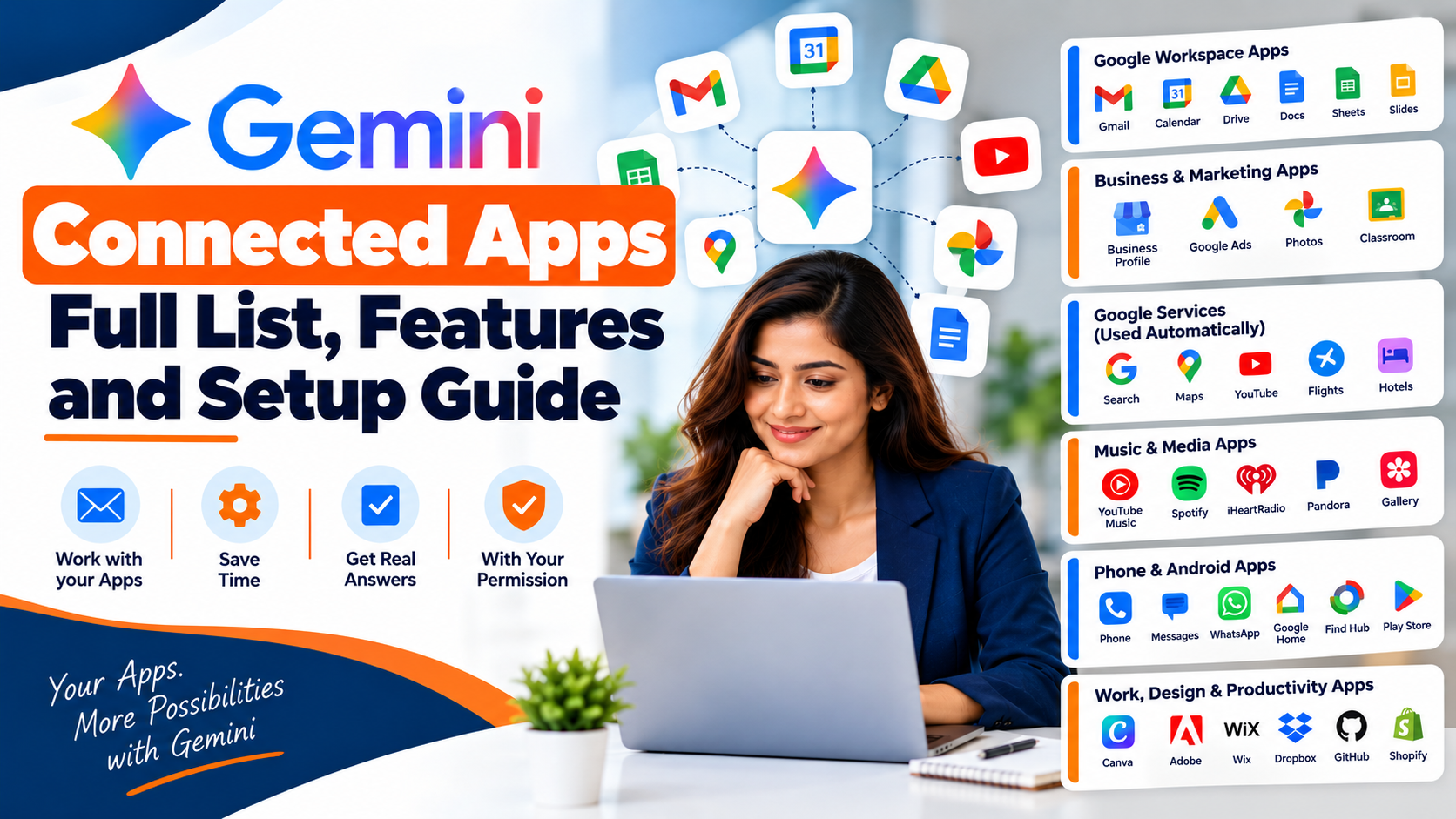
Gemini Connected Apps let Gemini work with the apps you already use. These include Gmail, Google Calendar, Google Drive, and YouTube Music. You just ask, and Gemini does the work. Need help with Google tools for your business? Visit our services page.
This guide shows the full list of Google apps and services. You will also learn how to turn them on and off. We checked Google’s official help page to keep it correct.
Quick Summary
- Connected apps let Gemini use your real apps, with your permission.
- You turn them on in the Connected Apps settings.
- Keep Activity must be on for most apps.
- The list changes by country, language, device, and account.
- Always check Gemini’s work before you use it.
What Are Gemini Connected Apps?
Gemini Connected Apps are apps that Gemini can work with. They help Gemini finish your requests.
Without them, Gemini gives general answers. With them, Gemini can use your real information. It only does this with your permission.
For example, Gemini can find an email in Gmail. It can add an event to Google Calendar. It can also edit your content in other apps, if you allow it.
You stay in control. You can connect or disconnect any app at any time.
Why Use Gemini Connected Apps?
Switching between apps wastes time. Connected apps save you steps. Google shares these examples:
- Work faster: Summarize emails from Gmail. Create events in Google Calendar.
- Play media: Play music from YouTube Music or Spotify. Search your photos and videos.
- Do daily tasks: Shop for groceries. Book a table at a restaurant.
- Connect with people: Make calls and send messages on Android. Use your default apps or WhatsApp.
- Control your devices: Manage smart home devices in Google Home. Set alarms on your phone.
Full List of Gemini Connected Apps (2026)
The list is long. It also changes by country, language, device, and account type. So we sorted the apps into easy groups.
Want the full and latest table? See Google’s full list of connected apps.
Google Workspace Apps (Gmail, Calendar, Drive)
This is the most useful group for most people. It covers these Google apps:
- Gmail
- Google Calendar
- Google Drive
- Google Docs, Sheets, and Slides
- Google Keep and Google Tasks
- Google Chat and Google Meet
Gemini can find, manage, and summarize your content in these apps. It works with personal, work, and school accounts. You must be 13 or older. You can use it on the web, on mobile, and in Gemini in Chrome.
Google Business Profile, Google Ads and Google Photos
These apps help with business and memories:
- Google Business Profile: Manage your business listing. Create a business notebook. You need a personal account and must be 18 or older. It works on the Gemini web app. It is not available in the UK or the European Economic Area. Hindi and English are supported. Local business owner? Read our simple guide to Google Business Profile and Gemini.
- Google Ads: Get business advice and tools. You need a personal account and must be 18 or older. It works in English.
- Google Photos: Search your photos, videos, and memories. It works only in some countries.
- Google Classroom: Get answers and plan your classes. It works only with work or school accounts.
Google Services Gemini Uses on Its Own
Some Google services need no switch. Gemini uses their public information by itself. These services are Google Search, Google Flights, Google Hotels, Google Maps, and YouTube.
Gemini will not use your personal data in these services. It needs your permission first.
Keep Activity must be on for Flights, Hotels, Maps, and YouTube. Google Search works even when it is off.
You no longer need to type @YouTube or @Google Maps. Just ask in plain words. For example, ask “find a video on fixing a flat tire.”
Music and Photo Apps in Gemini Connected Apps
These apps help you play music and find pictures:
- YouTube Music: Play music. Make playlists by mood, activity, or artist. It works on web and mobile.
- Spotify: Play or search music and podcasts. It works in the Gemini mobile app.
- iHeartRadio and Pandora: Play music and podcasts. They work in only a few countries, like the US.
- Samsung Gallery: Search your photos and albums. It works on some Samsung phones.
Phone and Android Apps
These apps work mainly on Android phones:
- Phone, Messages, and WhatsApp: Make calls and send texts.
- Device assistance: Change settings and set alarms.
- Google Home: Control your smart home devices.
- Find Hub: Keep track of your things.
- Google Play: Find and install apps.
- Phone brand apps: Calendar and notes apps from Samsung, Xiaomi, OnePlus, OPPO, vivo, HONOR, TECNO, and Lenovo. They work on selected devices only.
Work and Productivity Apps
Gemini also connects to many work tools. Here are some of them:
- Airtable
- Dropbox
- GitHub
- Granola
- Hootsuite
- Linear
- Miro
- monday.com
- Otter.ai
- PandaDoc
- Shopify
- Wispr AI
For example, GitHub lets you import a code project and ask about it. Hootsuite helps you check social media numbers and draft posts.
But many of these apps are for US users only. Many also work in English only. So check each app first.
Marketers can also read our list of AI tools for digital marketing.
Design and Website Apps
These apps help you create and build:
- Canva: Create designs and manage your files.
- Adobe: Work with Photoshop, Lightroom, and Creative Cloud.
- Wix, Squarespace, and Webflow: Design and manage websites.
- Picsart: Edit images and videos with AI.
Squarespace, Webflow, and Picsart are for US users only right now.
Shopping, Travel and Local Service Apps
Gemini also helps with daily life. Instacart helps you shop for groceries. OpenTable helps you book a table. Zillow and Apartment List help you find homes. Angi and Thumbtack help you find local experts.
For trips and events, you can use Viator, GetYourGuide, Fever, Ticketmaster, SeatGeek, and Bandsintown.
Most of these work in the US and in English only. So always check your country first.
Gemini Connected Apps for India
Some apps are made for users in India. They work in English.
- Urban Company: Find home service and beauty experts. Check prices. Track your bookings.
- Zoho apps: Zoho Mail, Zoho CRM, Zoho Desk, Zoho Projects, and Zoho Bigin. They help with email, sales, support, and projects.
Google Workspace and YouTube Music also work in many countries. Google Business Profile supports Hindi.
How to Turn On Gemini Connected Apps
It takes about one minute. Follow these steps on your computer:
- Go to gemini.google.com. Sign in to your Google account.
- Make sure Keep Activity is on.
- Click Settings & help. Then click Connected Apps.
- Switch on the app you want.
- Follow any steps on the screen.
Can’t find Connected Apps? Click Personal Intelligence first. Then click Connected Apps.
There is also a faster way. Type @ in the chat box. Then pick an app. If it is not connected, Gemini will connect it or ask your permission.
Want to know more about an app? Click Learn more under its name. You will see what it can do and example prompts.
How to Turn Off Gemini Connected Apps
You can disconnect an app at any time. Here is how:
- Open Settings & help.
- Click Connected Apps.
- Find the app.
- Switch it off.
Did you link a third-party account, like Spotify? You can unlink it in your Google account settings. To learn how Google handles your data, read the Gemini Apps Privacy Hub.
Gemini Connected Apps Requirements
Check these points first. They solve most problems.
- Sign in. You must be signed in to use connected apps.
- Turn on Keep Activity. When it is off, connected apps do not work on gemini.google.com, iOS, or smart watches. On Android, only Device assistance, Phone, Messages, and WhatsApp work.
- Check your account type. Some apps need a personal account. Others also work with work or school accounts.
- Check age, country, and language. Many apps have age rules. Many work only in some countries or in English.
- Know the limit. Gemini cannot use connected apps inside Google Messages for now.
Advanced users can connect custom apps with an MCP server. But access is limited. So check Google’s help page before you try.
Easy Prompts for Gemini Connected Apps
Not sure what to type? Try these. You can change the words to fit your needs.
- “Summarize my unread emails from Gmail.”
- “Find my project notes in Google Drive.”
- “Add a meeting to Google Calendar for Friday at 4 PM.”
- “Play a relaxing playlist on YouTube Music.”
- “Create a simple poster design in Canva.”
Privacy Tips for Gemini Connected Apps
Connected apps are helpful. But your data matters. Follow these habits:
- Connect only the apps you need.
- Read what Gemini wants to do before you approve it.
- Check every email, post, or edit before you send it. AI can make mistakes.
- Turn off apps you do not use.
- Read Google’s Privacy Hub to learn how your data is handled.
Why Some Apps Are Missing
Can’t see an app from this list? Don’t worry. This is common. The reason is usually simple.
- Keep Activity is off.
- The app is not in your country or language.
- You use the wrong account type, or you do not meet the age rule.
- The app works only on mobile, only on Android, or only on some phones.
Google says your list depends on your app, device, and country. So your list may look different from your friend’s list.
Tips for Business Owners and Marketers
Connected apps can save you hours each week. Try this plan:
- Use Gmail and Google Drive to summarize long emails and find files fast.
- Use Google Calendar to plan meetings and content dates.
- Connect Google Business Profile and Google Ads if you run a local business.
But remember, AI is a helper. It does not replace your judgment. To see the bigger picture, read how AI is changing digital marketing.
Do you run a business in Faridabad? These marketing tips for small businesses in Faridabad may help.
Gemini Connected Apps FAQs
Are Gemini Connected Apps free to use?
You can open the Gemini app for free. But some apps may need a Google AI subscription. Google lists this for each app in its table.
Where do I find Gemini Connected Apps in settings?
Go to gemini.google.com. Click Settings & help. Then click Connected Apps. If you can’t see it, click Personal Intelligence first.
Do Gemini Connected Apps work in India?
Many Google apps work in India. Google Workspace is one example. Some outside apps are US only. But Urban Company and Zoho are made for India. Always check the app’s details page.
Why can’t I see connected apps on my iPhone?
The top reason is that Keep Activity is off. Also, some apps work only on Android. Some work only on the web app.
Can Gemini read all my emails after I connect Gmail?
Gemini uses a connected app to finish your request. You choose which apps to connect. You can disconnect them at any time. Read Google’s Privacy Hub for full details.
Can I use connected apps with a work or school account?
Some apps can. Google Workspace and YouTube Music are two examples. Other apps need a personal account. Google also has a separate help page for work and school accounts.
Can I connect my own app?
Advanced users can connect a custom app with an MCP server. Access is limited right now. Check Google’s help page first.
Do I need to connect every app?
No. Connect only what you need. Start with one or two apps. Then add more later.
Conclusion
Gemini Connected Apps turn Gemini into a real helper. They link your email, calendar, files, music, and business tools in one chat.
The list is long, and it keeps growing. But the idea is simple. Connect only what you need. Keep Keep Activity on.
Start small. Turn on Google Workspace. Try one prompt. See how much time you save. Then add more apps when you are ready.
Google changes this list often. So check your own Connected Apps settings now and then.